Process Mining Data
Process mining data is the event-based data used to reconstruct how a process actually runs across systems, activities, and time.



Process mining data is the event-based data used to reconstruct how a process actually runs across systems, activities, and time.
Process mining depends on data. Without the right data, even the best process mining approach will produce limited or misleading results.
That is why this page focuses only on the data side of process mining. It explains what process mining data is, what a usable dataset looks like, where it comes from, how it is collected, and why preparation and quality matter before analysis begins.
Within process discovery, process mining data helps teams move beyond assumptions and see how a process actually runs in practice. While process maps and workshops provide structure, the data provides the execution evidence behind it.
Process mining data is the set of records used to reconstruct how a business process runs over time. In most cases, this data comes from the systems that support daily work, such as ERP, CRM, ticketing, workflow, or finance systems.
The core idea is simple: every time something happens in a process, a system may record it. These records can then be organized into an event log and used to analyze the real flow of work.
Not all operational data is useful for process mining. To reconstruct a process, the data must show what happened, when it happened, and which process instance it belongs to.
At a minimum, a usable process mining dataset usually needs:
These three fields form the basic structure of an event log. Without them, it becomes difficult or impossible to rebuild the process flow.
The minimum structure is enough to reconstruct the process, but richer datasets allow deeper analysis.
Additional fields often include:
These fields do not define the process flow itself, but they make it easier to segment, compare, and explain what is happening inside the process.
Process mining data is usually organized as an event log. In simple terms, an event log is a table where each row represents one event that happened in a process.
This structure makes it possible to reconstruct the order of activities for each process instance. Instead of looking at one row as a complete process, process mining tools group rows that belong to the same case and then arrange them over time.
A simple event log might look like this:
| Case ID | Activity | Timestamp | Resource | System |
|---|---|---|---|---|
| 1001 | Create order | 2026-03-01 09:02 | Sales Rep A | CRM |
| 1001 | Approve order | 2026-03-01 10:14 | Manager B | ERP |
| 1001 | Ship order | 2026-03-02 08:45 | Warehouse C | WMS |
| 1002 | Create order | 2026-03-01 09:20 | Sales Rep D | CRM |
| 1002 | Approve order | 2026-03-01 11:05 | Manager B | ERP |
| 1002 | Ship order | 2026-03-03 14:10 | Warehouse F | WMS |
This is a small example, but the logic is the same in larger datasets with thousands or millions of rows.
An event log becomes easier to understand once each column has a clear meaning.
In the table above, all rows with Case ID 1001 belong to one order. The timestamps show the order of events, which allows the process flow to be reconstructed.
This structure is what makes process mining possible. Once the dataset is organized this way, teams can analyze paths, timing, variants, bottlenecks, and handoffs across many cases at once.
A process mining dataset does not need to be complex to be useful, but it does need to be structured consistently. If activity names are inconsistent, timestamps are missing, or case IDs are unclear, the resulting process view may be incomplete or misleading.
That is why good process mining starts with a well-structured event log, even before deeper analysis begins.
Data is usually not created specifically for process mining. In most cases, it already exists inside the systems that organizations use to run their daily operations.
The challenge is not whether the data exists, but whether it can be identified, extracted, and organized into a usable event log.
Most event data comes from core business systems. These systems record activities as work moves through the process, which makes them a natural source for process mining.
Common sources include:
In practice, many process mining projects combine data from more than one of these systems because the full process often spans several tools.
Not all process mining data comes directly from live systems. In many organizations, the first dataset is created from exported files rather than from a direct system connection.
This can include:
These sources are often useful when teams want to test process mining on a limited scope before moving to recurring data flows.
Event logs are the most common foundation for process mining, but they are not the only useful data source. In more advanced environments, organizations may combine event data with other forms of process-related information.
Examples include:
These data types do not replace event logs, but they can enrich analysis and help explain why the process behaves differently across cases.
Collecting data for process mining usually starts with a business question, not with a file. Teams first need to understand which process they want to analyze and what should count as one process instance.
This matters because raw system records are rarely ready to use as process mining data. Before analysis can begin, teams need to identify the right events, connect them to the right case, and make sure the data reflects the actual process flow.
The first step is to define what the process is and what a single case represents. In process mining, the case is the unit that ties multiple events together over time.
For example, a case could be:
Once the case concept is clear, the team can decide which activities belong to that case and which systems record them.
This step helps avoid one of the most common data problems: collecting events that are technically related, but do not belong to the same process instance in a meaningful way.
After the process and case are defined, the next step is to extract the relevant event records from the source systems.
In simple cases, all needed data may come from one system. In more realistic business environments, the data often comes from several systems, each recording a different part of the same process.
For example, one process may use:
The main task is to collect the events and connect them to the same case. That often requires matching IDs, aligning timestamps, and deciding which records represent real process events.
Once the main event data is collected, many teams enrich it with business context. This is not always required to reconstruct the flow, but it adds analytical value and makes the results easier to interpret.
Useful context fields often include:
These fields help teams compare how the same process behaves across different situations. Without them, the process can still be reconstructed, but it is harder to explain why certain variants or bottlenecks appear.
The final collection step is to transform the source records into a structured event log. This means creating a dataset where each row represents one event and where the case ID, activity, and timestamp are clearly defined.
At this stage, teams usually need to:
This is the point where collection starts to overlap with preparation. In practice, the two are closely linked because the data often needs some transformation before it becomes usable for mining.
Once the data is collected, it needs to be loaded into the process mining environment in a way that preserves case structure, activity names, and timestamps. The right method depends on how mature the organization is, how often the data needs to be refreshed, and how many source systems are involved.
Some teams start with manual uploads for a limited use case. Others build direct integrations so the data can be refreshed regularly and used for ongoing analysis.
File uploads are one of the simplest ways to bring data into process mining software. Teams usually export data from source systems into formats such as CSV or Excel, then upload the files into the tool.
This approach is often useful when:
File uploads are practical for getting started, but they also have limits. They usually require manual effort, and the dataset can become outdated quickly if the process changes often.
In more mature setups, teams often connect source systems directly to the software. This can be done through standard connectors, integration services, or direct system-level connections.
This approach is more suitable when:
Direct integrations reduce manual work and make it easier to keep the process view current over time. They are especially useful when process mining becomes part of an ongoing discovery or improvement practice rather than a one-time project.
Some organizations need more flexibility than a simple upload or standard connector can provide. This is common when the process spans several systems or when the data needs to be transformed before it becomes usable.
In these situations, teams often use APIs or broader data pipelines to extract, combine, and prepare data before loading it into the software.
This approach is useful when:
This is usually the most scalable option, but it also requires more technical coordination.
How data enters the software also affects how often it can be refreshed.
A manual refresh may be enough for a workshop, pilot, or short-term discovery effort. An automated refresh becomes more important when teams want to monitor the process repeatedly, compare periods over time, or support continuous analysis.
In practice:
The more often the process changes, the more valuable automated refreshes become.
That is why the loading method is part of the data strategy, not just a technical detail.

Process mining tools can work with several data formats, but all of them try to represent the same thing: events tied to a case over time.
The format matters because it affects how easily the data can be loaded, validated, and reused in analysis.
The most common starting point is a tabular dataset. This is often the easiest way to prepare and inspect event data before loading it into software.
Typical examples include:
These formats work well for pilots, smaller datasets, and exported data from business systems.
Some formats are designed specifically for process mining and event data exchange.
The most common examples are:
These formats are useful when teams need a more formal event log structure or want to move logs between tools.
Most process mining datasets are case-centric, which means all events are linked to one case concept, such as an order, invoice, or ticket.
In more advanced scenarios, teams may use object-centric structures, where several related business objects are connected in the same dataset. This helps when one process cannot be explained well through a single case ID.
What matters most is not the format itself, but whether the data can represent:
That is what makes the dataset usable for process mining.
Good process mining does not start with analysis. It starts with preparing the data so the event log reflects the process correctly.
Raw operational data is rarely ready to use as-is. Even when the right events exist, they often need to be cleaned, aligned, and structured before they can support reliable insights.
Several issues appear frequently when teams prepare process mining data.
Typical examples include:
If these problems are not addressed, the process flow may look different from reality.
Data preparation helps turn raw records into a usable event log. The goal is not to make the data perfect, but to make it consistent enough for analysis.
This often includes:
In many projects, this preparation work takes more effort than expected.
If the underlying data is weak, the process insights will be weak too. A missing timestamp can change the order of events. An inconsistent activity name can create false variants. A broken case ID can split one process instance into several unrelated ones.
That is why data preparation is not just a technical step. It directly affects how credible the process mining results will be.
A strong dataset does more than load into the software. It gives teams a reliable basis for understanding how the process actually runs.
The difference is not just volume. A large dataset can still be weak if key fields are inconsistent, activities are unclear, or the case concept does not reflect the real process.
The best datasets usually have a few things in common. They are structured clearly, stable enough to trust, and rich enough to support meaningful analysis.
A strong process mining dataset typically includes:
These qualities make it easier to identify variants, bottlenecks, delays, and handoffs without constantly questioning the data itself.
It is tempting to think that more columns always mean better data, but that is not always true. A good dataset includes the data that helps explain the process. Irrelevant technical fields can add noise without improving understanding.
That is why strong datasets are usually built around relevance. They contain the fields needed to reconstruct the process and enough business context to explain why the process behaves differently across cases.
A dataset becomes more valuable when it can be refreshed and reused consistently. If extraction logic changes every time, or activity names shift across exports, it becomes difficult to compare results over time.
Strong teams aim for a dataset that is not only useful once, but stable enough to support repeated discovery and analysis.
Customer stories help make the data side of process mining easier to understand because they show what event data is actually used for in practice. In most cases, the goal is not simply to collect more records. It is to connect process events well enough to answer a business question.
These examples all point to the same conclusion: good process mining does not start with analysis alone. It starts with event data that is structured well enough to turn execution records into process understanding.
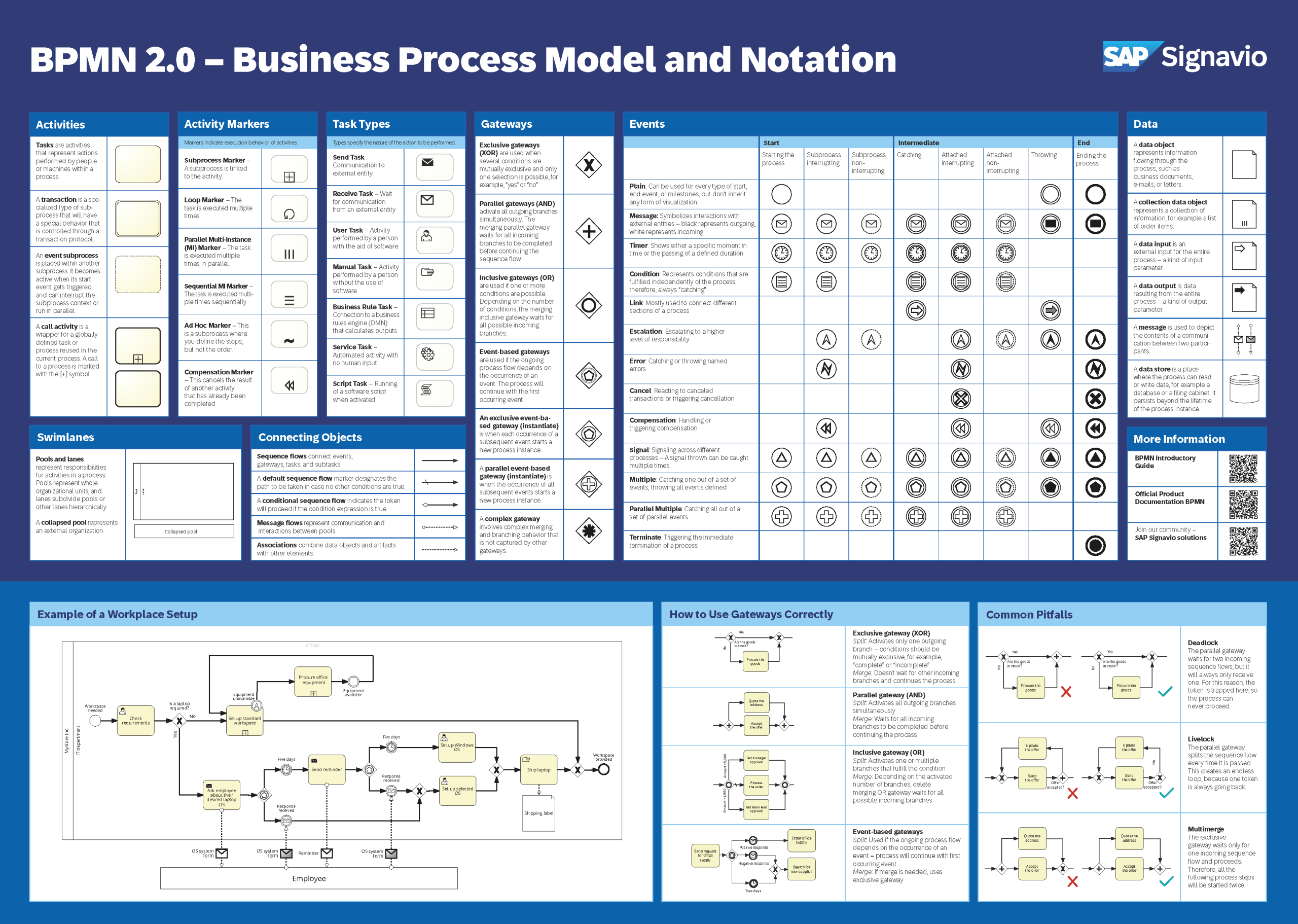
Get a BPMN 2.0 overview poster with the various graphical elements, examples of applications, and their meaning.