Types of business process management software
Business process management is not a single tool category. Different types of BPM software support different parts of the lifecycle and address different operational needs.
Many organizations use more than one type, while others adopt intelligent platforms that combine multiple capabilities.
Understanding these types helps teams clarify what role software should play in their BPM practice—before evaluating specific vendors or tools.
1. Process modeling and documentation tools
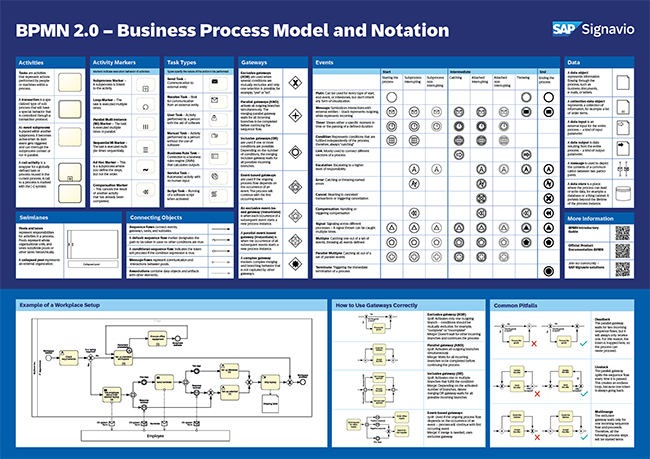
Process modeling tools focus on capturing and visualizing how work is performed. They are used to document processes in a structured and standardized way, often using notations such as BPMN.
These tools support shared understanding by making processes easy to review, discuss, and update. They are commonly used early in BPM initiatives or as a foundation for governance and improvement .
They are typically used to:
- Model current and future-state processes
- Establish documentation standards
- Share process knowledge across teams
→ Related: Process Modeler Software
2. Workflow and process automation tools
Workflow tools support the execution of process steps by routing tasks, approvals, and notifications between users or systems. They focus on doing the work, rather than documenting or analyzing it.
While workflow tools are often part of BPM initiatives, they usually address a narrower scope and may not provide full visibility into end-to-end processes.
They are typically used to:
- Automate task sequences and approvals
- Reduce manual coordination
- Enforce execution rules
3. Process mining and analysis tools
Process mining tools analyze execution data from operational systems to show how processes actually run in practice. They reveal patterns, bottlenecks, deviations, and performance issues that are difficult to identify through workshops alone.
These tools are especially useful when processes are complex, high-volume, or span multiple systems.
They are typically used to:
- Discover real process flows
- Measure performance using system data
- Identify improvement opportunities
→ Related: Process Analysis Software
4. Process governance and collaboration platforms
Governance-focused BPM tools support ownership, review cycles, approvals, and collaboration around processes. They help organizations maintain consistency and control as processes change over time.
These tools are important when BPM needs to scale beyond a few teams or when auditability and accountability matter.
They are typically used to:
- Manage process ownership and lifecycle
- Control versions and approvals
- Support cross-team collaboration
→ Related: Process Governance Software
5. Process Intelligence - Integrated BPM platforms
Integrated BPM platforms combine modeling, governance, analysis, and sometimes automation in a single environment. They are designed to support BPM as an ongoing practice rather than isolated activities.
Organizations often adopt integrated platforms when BPM becomes part of broader transformation or operational management efforts.
They are typically used to:
- Support the full BPM lifecycle
- Scale BPM practices across the organization
- Connect process work to data and execution
→ Related: Process Intelligence Software and Process Transformation Software
How BPM software supports the BPM lifecycle
BPM software supports different stages of the BPM lifecycle by making process work visible, structured, and easier to maintain.
The role of software changes across the lifecycle—from discovery and analysis to execution and optimization—but the objective remains the same: to support consistent and repeatable process improvement.
Process discovery
During process discovery, BPM software helps teams capture how work is actually performed. Modeling tools and repositories provide a shared space to document processes based on workshops, interviews, or data-driven insights.
Software support at this stage focuses on:
- Creating a consistent way to capture processes
- Making undocumented work visible
- Aligning stakeholders around a shared understanding
Discovery does not require automation. The value comes from transparency and structure.
Process analysis
In the analysis stage, BPM software helps teams understand where processes break down and why. This includes identifying delays, rework, variations, and performance gaps.
BPM software supports analysis by:
- Linking processes to KPIs and performance data
- Visualizing handoffs and dependencies
- Enabling data-driven insights through analytics or process mining
Analysis shifts improvement discussions from opinions to evidence.
Process design
Process design focuses on defining how work should be performed in the future. BPM software supports this by enabling teams to model future-state processes, compare alternatives, and document standards.
At this stage, software is used to:
- Design and publish future-state workflows
- Define roles, responsibilities, and handoffs
- Document standards and allowed variations
Design outputs become the reference point for implementation.
Process implementation
During implementation, BPM software helps embed redesigned processes into daily operations. This may involve publishing documentation, configuring workflows, or integrating with operational systems.
Software supports implementation by:
- Making approved processes accessible to users
- Supporting workflow execution where applicable
- Connecting process models to tools and systems
Implementation focuses on adoption, not just deployment.
Process optimization
In the optimization stage, BPM software helps teams monitor performance and refine processes over time. Measurement and feedback loops are critical here.
BPM software supports optimization by:
- Tracking KPIs and execution data
- Highlighting deviations and improvement opportunities
- Supporting controlled updates and versioning
Optimization turns BPM into a continuous practice rather than a one-time effort.